48%
of real-world bugs caught*
Cursor BugBot: 42%
76¢
average Balanced review, 55¢ on Budget. Priced per KB with a 10 KB minimum, never per seat.
* September 2025 benchmark of real-world bugs, run before Code Review v3. View results








 |  | |
|---|---|---|
Pricing | Usage-based pricing | Usage-based, inside a Cursor subscription |
AI-Powered Bug Detection | Industry-leading bug detection. Caught 14% more bugs than Cursor BugBot.* | Good, but ranked below Macroscope in runtime bug detection.* |
Noise in Code Review | Top signal-to-noise ratio. | 0.9 comments per PR. |
Productivity Insights | Built-in productivity analytics. | Lacks productivity analytics; no project classification. |
Reports & Macros | Customizable recurring prompts. | No automated or custom reports. |
Integration with Jira and Linear | Context from Jira and Linear tickets. | Doesn't use context from tickets in code review. |
Broadcast Code Activity in Slack | Live commit and PR summaries. | No live, real-time stream of activity in Slack. |
Query Directly in Slack | Ask your codebase anything. | No codebase Q&A in Slack. |
Code Review CLI | Review before you push. Plugins for Claude Code, Codex, Cursor and OpenCode. | Cursor CLI agent can run scripted code reviews in headless mode. |
Check Run Agents | Custom AI reviewers. Plain-English checks, each a named GitHub check run. | No custom AI check runs. |
PR Summaries in GitHub | Automated PR Summaries | Automated PR Summaries |
 Python
 TypeScript
 Kotlin
 Java
 Rust
 Swift
 GoPythonTypeScriptKotlinJavaRustSwiftGo

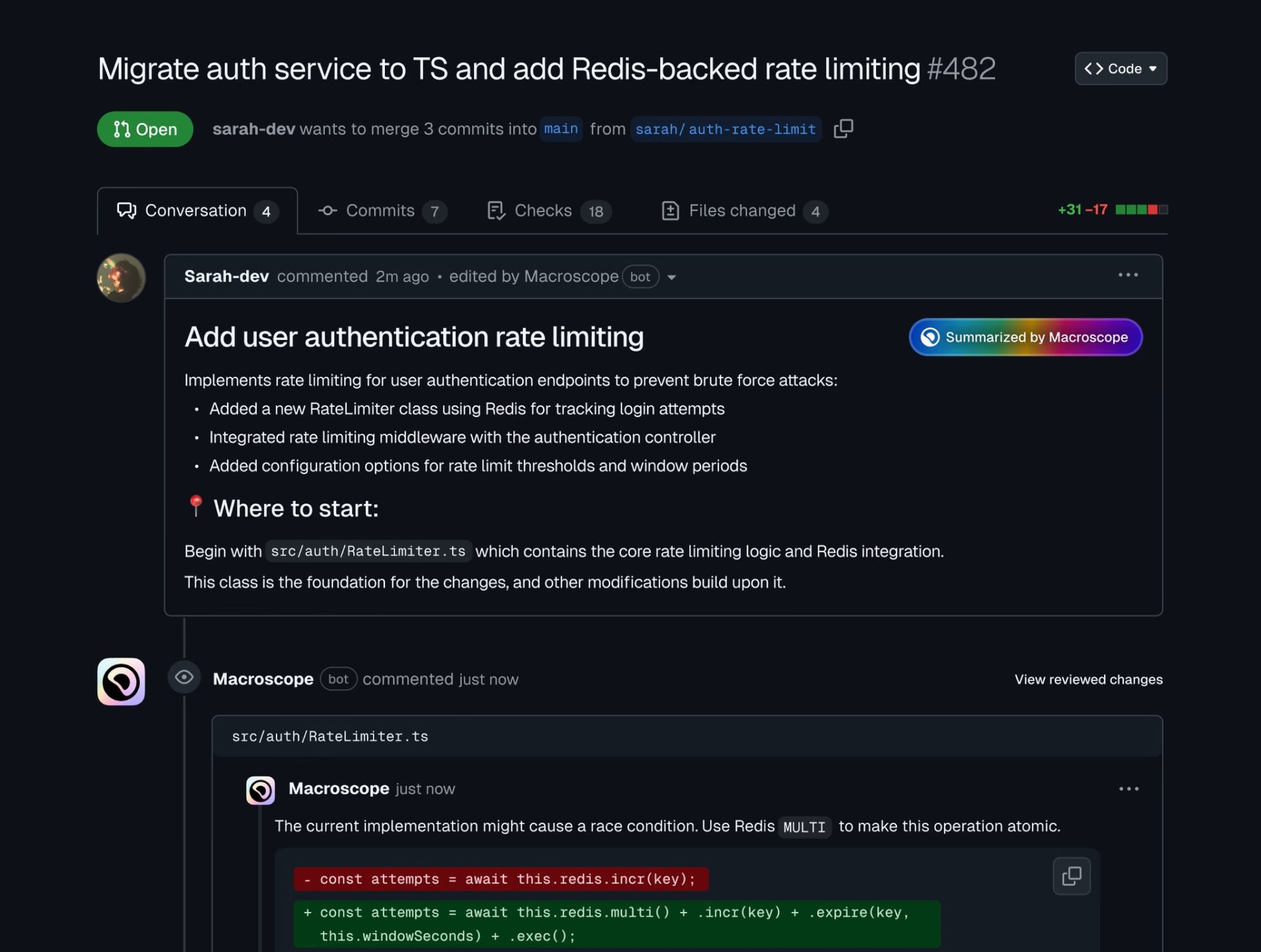
The correctness issues you'll want to fix, not style noise.

Explores the code around each change to find hard-to-detect bugs.

Reviews every PR against its linked ticket.
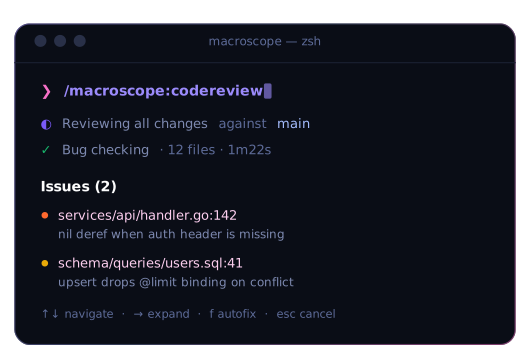
The same review before you push, in Claude Code, Codex, Cursor and OpenCode.
Keeping your data secure is of paramount importance to us. We have rigorous technical, operational and contractual safeguards in place to protect customer data.
Visit our Trust Center to request copies of our audited documentation.

All customer data is encrypted at rest and in transit.

Customer Code is architecturally isolated and secured by design. None of our employees can access your source code.

Macroscope does not train models using your source code, and our agreements with model providers ensure they do not train using your IP.
Read from cursor.com on 11 August 2026: Bugbot is billed on usage inside a Cursor subscription rather than as a separate per-seat product. So a per-seat comparison is not the right lens here, and anyone telling you Bugbot charges a developer seat fee is wrong. Macroscope is also usage-based, at $0.05 per KB reviewed with a 10 KB minimum, and reviews average 55¢ on Budget and 76¢ on Balanced, and it does not require a Cursor subscription to run.
If your team already lives inside Cursor, Bugbot is convenient and it does catch bugs. On a benchmark of 118 real runtime bugs Macroscope detected about 48% against Cursor Bugbot's about 42%. The structural difference is where the review happens: Bugbot is tied to a Cursor subscription, while Macroscope runs as a GitHub App on every pull request regardless of which editor or agent wrote the code, and adds Check Run Agents, commit intelligence and an AI agent on top.
In a benchmark of 118 real runtime bugs, Macroscope detected ~48% vs Cursor Bugbot's ~42%. Macroscope provides deeper cross-file analysis with full-repository context, plus commit intelligence and an AI agent.
Teams switch to Macroscope from Cursor Bugbot for production-grade AI code review with usage-based pricing, custom Check Run Agents, and deep GitHub integration.
Macroscope catches more bugs (48% vs 42% in benchmarks), offers usage-based pricing at $0.05/KB, and includes features beyond code review: commit intelligence, productivity insights, and an AI agent.
Macroscope reads each change, then explores the surrounding code in your repository to understand context beyond the diff. This allows Macroscope to detect subtle bugs that other AI reviewers often miss.
No. Macroscope integrates directly into your existing workflow and is designed to complement your existing tools. Once installed, Macroscope will automatically start summarizing PRs and leaving code review comments directly on GitHub.
Yes. Product managers, engineering managers, customer success teams, and executives use Macroscope to stay informed about what's changing in their product and codebase.
All of them. Macroscope reviews pull requests in every language, so there is no list to check your stack against. Commit and PR summaries, project tracking, and productivity insights work across every language too.
Macroscope is used by startups and enterprise engineering teams alike, from 5-person teams to 100+ engineer orgs.
Teams can get up and running in under 5 minutes. Install the GitHub app, connect Slack (optional), and you're ready! New customers get $100 in usage credit so you can get going right away. It's usage-based, so you only pay for the code you review. Macroscope immediately begins analyzing open PRs and backfilling recent code activity.
Yes. Macroscope installs as a GitHub app and reviews every pull request automatically, posting comments inline the moment a PR opens. Unlike a rules-based bot, it builds a graph of your entire codebase first, so it comments on bugs that matter instead of pattern-matching on style.
Macroscope is usage-based: it bills per KB of diff reviewed, not per developer seat, so your cost tracks how much code you actually ship rather than how many people are on the team. Reviews average 55¢ on Budget and 76¢ on Balanced. New teams start with $100 in usage credit.
Linters and static analysis match patterns inside a single file. Macroscope reads each change in the context of your whole repository, following callers, types and imports across files, so it catches bugs that span files, functions and services, which is the class of bug a linter structurally cannot see. It also means far fewer false positives, because it can tell whether a suspicious line is actually reachable.
Yes, and it is the main reason teams adopt it. When Copilot, Cursor or a coding agent writes most of a pull request, the bottleneck moves from writing code to reviewing it. Macroscope reviews AI-written PRs the same way it reviews human ones, and Approvability auto-approves the low-risk ones so engineers only look at what genuinely needs a human.
It depends what you want it to catch. On our benchmark of real production bugs from open source repositories, Macroscope detected 48% of 118 bugs, the highest rate of the five tools tested. Run the comparison yourself: most teams evaluate on a week of their own pull requests, which is a better signal than any vendor benchmark including ours.
Both, depending on how you use it. As an AI code review platform it reviews every pull request, writes PR summaries, and gives engineering leaders a view of what is shipping. Most teams start with automated PR review on GitHub and adopt the rest later.
Traditional code quality tools score a snapshot of your repository against fixed rules, which is useful for tracking coverage and style but rarely catches a real bug. AI-powered code review reasons about the change itself, in the context of the codebase around it, and tells you what will break. Teams generally keep both: one for hygiene, one for correctness.
Not yet. Macroscope currently supports GitHub, and GitLab and Bitbucket are on the roadmap. If you are on either one, book a demo and we will let you know when support lands.
Join teams building with Macroscope to catch more bugs and merge PRs faster than ever. Simple usage-based pricing. No seat fees, no surprises.
