
Macroscope for Open Source
We are offering Macroscope available at no cost for non-commercial open source projects.
tl/dr: We are offering Macroscope to non-commercial open source projects for free. Apply here. We're also looking to sponsor the best open source projects.
Starting today, we’re making Macroscope available at no cost for qualified open source projects.
Is there a free AI code review tool for open source projects?
Yes. Macroscope is a free AI code review tool for qualified non-commercial open source projects: maintainers apply, and approved projects get Macroscope's AI code review, PR summaries and bug detection on their GitHub pull requests at no cost. The program is described on the Macroscope for open source page.
Three criteria decide who qualifies:
- Open source license. The project must use an open source license, such as MIT, Apache 2.0 or GPL.
- Non-commercial use. The project must be used for non-commercial purposes and not be sold or offered as a paid product or service.
- Active community and fit. Macroscope prioritizes projects with an active developer community and a strong fit with the developers it builds for.
Open source projects start on the Budget detection mode and can switch any repository to Balanced or Precise when a change deserves a deeper review. Ultra stays on paid plans. The detection modes write-up explains the trade-off between them.
If your project is commercial, Macroscope is usage-based rather than per seat: Code Review costs $0.05 per KB of diff reviewed in the default Balanced mode, with a 10 KB minimum per review, and there are no seat fees. Billed reviews averaged 76¢ in Balanced mode and 55¢ in Budget mode between September 29 and October 28, 2026. Every new workspace gets $100 in free usage. See pricing and the cheapest AI code review options for small teams.
The pain points that Macroscope solves for traditional software companies are just as relevant, if not more painful, for open source communities:
- Shipping fewer bugs. It’s already becoming completely standard for every professional software company to have an AI code review tool that serves as a last-line of defense to catch bugs. The cost of shipping bugs is far too high, and well-built AI review tools are capable of identifying correctness issues faster than human reviewers. But in our research, usage of AI Code Review tools is still quite low amongst the open source community, in large part due to cost. By making Macroscope free for open source projects, we hope to make that a thing of the past.
- Reducing the time-suck of code review. Open source contributors spend time not just doing work, but doing the work around the work: explaining what they changed, how their changes impact the codebase, and how their code should be tested by reviewers. This takes time for contributors. Macroscope expedites this process by automatically describing changes, which saves time for reviewers and improves the standard review experience for maintainers of open source projects. And of course, reviewers can spend less time reviewing PRs by virtue of relying on Macroscope to do a first-pass of identifying correctness issues and suggesting fixes.
- Understanding what’s happening with minimal project management burden. Maintainers and stakeholders of open source projects care about understanding how their codebase is changing, which is an especially difficult problem given the distributed/decentralized nature of open source. Maintainers have the added difficulty of managing a project without some of the luxuries and affordances of a traditional enterprise (e.g. project management and collaboration tools, product managers and other folks whose jobs are to pull together a picture of what’s happening). Macroscope’s status features solve this by summarizing codebase activity automatically, so that every stakeholder can understand what’s happening without process overhead.
As a reminder, here are some of Macroscope’s features:
Auto-generated code summaries
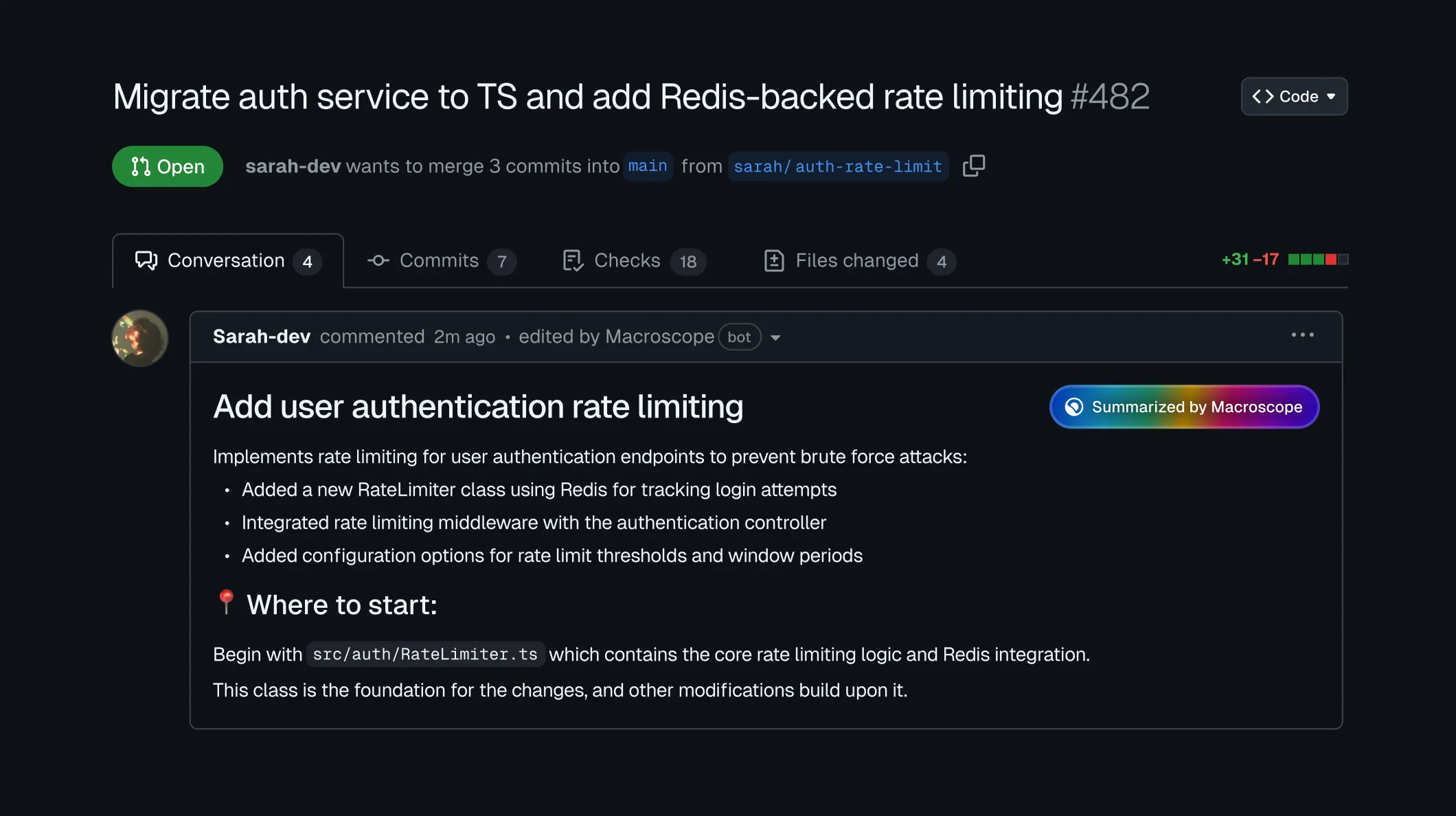
For each pull request, Macroscope generates a concise summary and suggests where reviewers should start (how AI PR summaries work). This helps reviewers quickly understand what changed and where to focus their attention, especially in larger PRs.
If a PR has no description, Macroscope automatically adds a summary directly to the PR description. If a contributor has already written a PR description, Macroscope posts its summary as a comment. Macroscope’s summaries can also be inserted directly into PR templates.
When changes are made to a PR (e.g. a new commit) Macroscope automatically updates the PR description to reflect the latest changes.
Bug detection in PRs
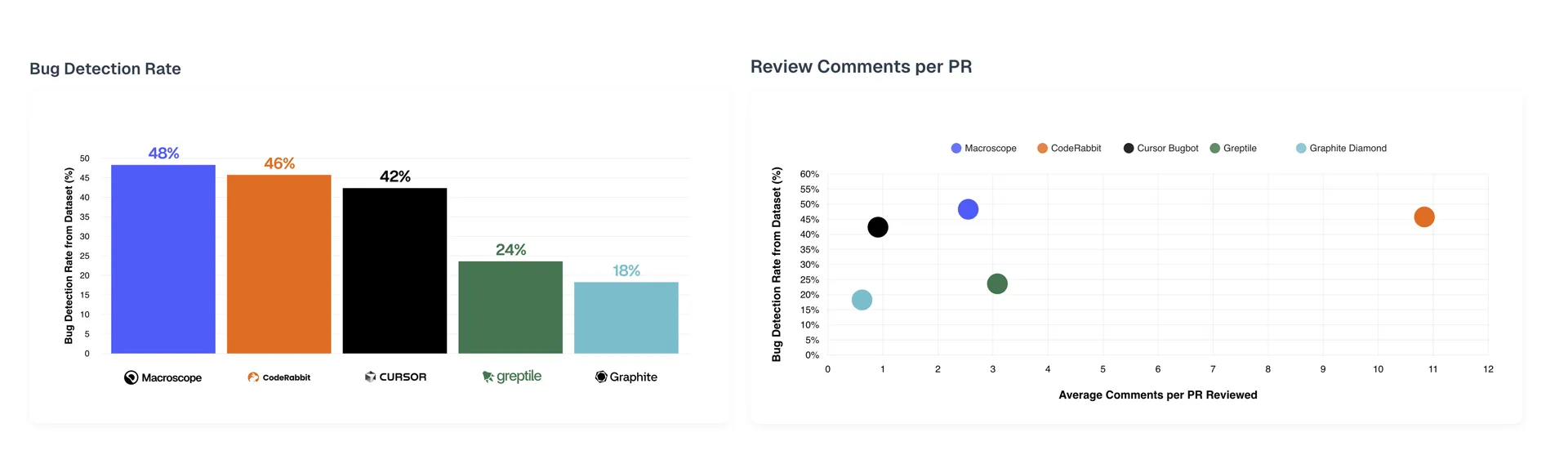
Macroscope finds and fixes bugs in your PRs, and it aims to do so without burying maintainers in comments. In our September 2025 benchmark evaluation, Macroscope identified the most bugs of the tools tested, with a modest “comment volume” of 2.6 average comments per PR. In Macroscope's current 118-bug Code Review Benchmark, it caught 48.3% (57 of 118). For why comment volume matters as much as detection, see AI code review false positives and signal-to-noise.
When Macroscope spots a bug, it will add a review comment describing the issue, and propose a diff that can be applied to fix the bug. You can converse with Macroscope directly in the PR comments to seek clarification and propose alternatives– Macroscope’s code research agent will respond in the PR.
Visibility and insights
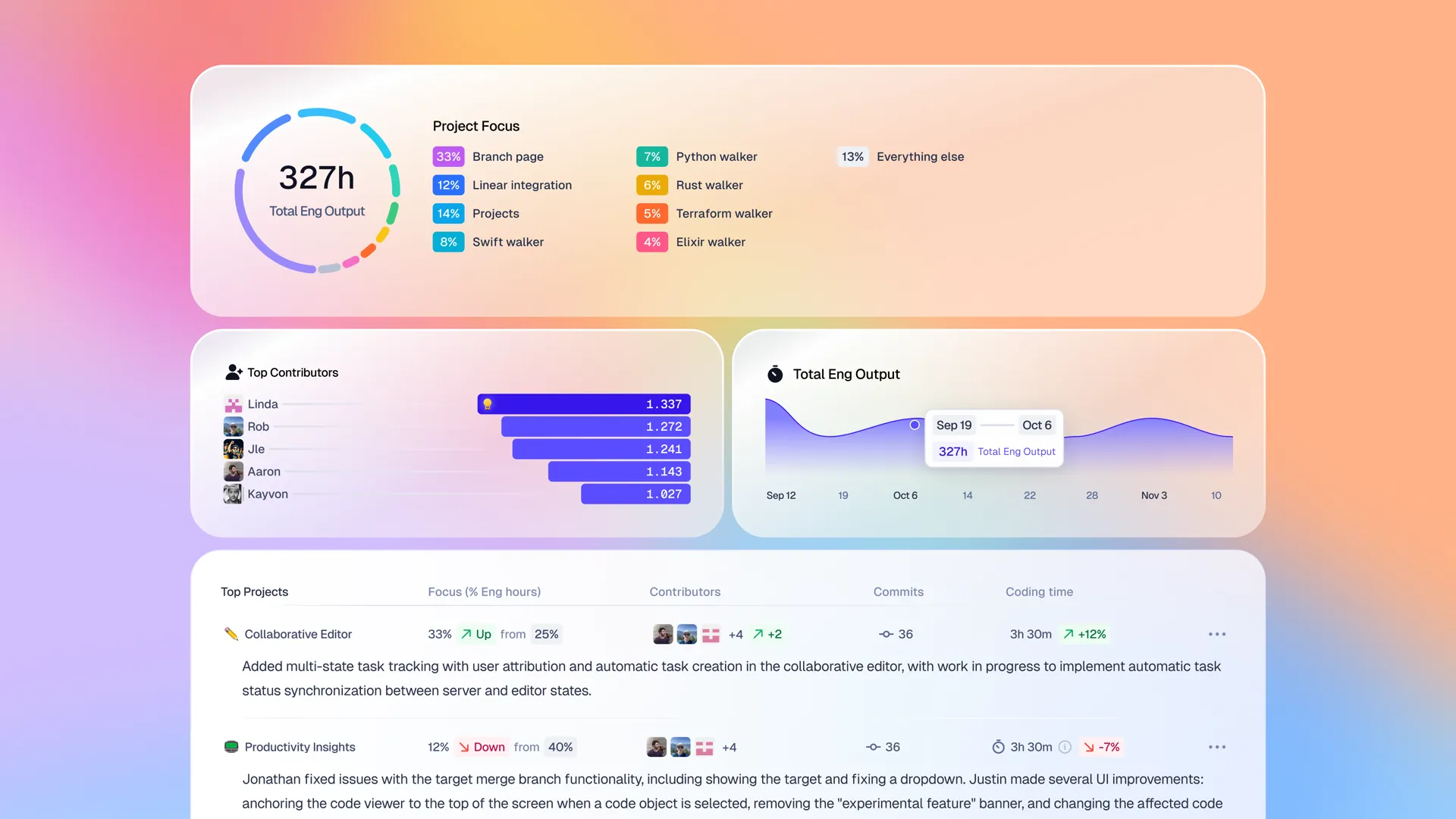
Macroscope leverages codebase activity to automatically create summaries of how the codebase is changing, what projects and features are being worked on, and who’s contributing what. We think this will serve as a helpful automated birds-eye view for maintainers of open source projects, and for any stakeholder of an open source project who wants to understand what’s changing without digging through individual PRs.
We’re sponsoring open source
We're also looking to sponsor the best open source projects.
Recommend a project by tagging @macroscope on X or emailing us at contact@macroscope.com.
Get access to Macroscope
Maintainers of non-commercial open source projects: apply for free access to Macroscope.
We’re still learning what features are most valuable for open source projects, so we're excited to hear your feedback.

Note: we reserve the right to limit usage based on reasonable use criteria.
Frequently Asked Questions
Is there a free AI code review tool for open source projects?
Yes. Macroscope is free for qualified non-commercial open source projects. Maintainers apply through the open source program, and approved projects get AI code review, bug detection and PR summaries on their GitHub pull requests at no cost.
Who qualifies for Macroscope's free open source program?
Projects that use an open source license (MIT, Apache 2.0, GPL and similar) and are used for non-commercial purposes, meaning they are not sold or offered as a paid product or service. Macroscope prioritizes projects with an active developer community.
Which detection modes do open source projects get?
Open source projects start on Budget and can switch any repository to Balanced or Precise when a change deserves a deeper review. Ultra stays on paid plans.
How do I apply for free AI code review for my open source project?
Fill in the application form. Once approved, install the Macroscope GitHub App on the project's repositories; the GitHub setup guide walks through it.
What does AI code review cost if my project does not qualify?
Macroscope is usage-based with no seat fees. Code Review costs $0.05 per KB of diff reviewed in the default Balanced mode, with a 10 KB minimum per review. Billed reviews averaged 76¢ in Balanced mode and 55¢ in Budget mode between September 29 and October 28, 2026, and every new workspace gets $100 in free usage.
Can I recommend an open source project for sponsorship?
Yes. Tag @macroscope on X or email contact@macroscope.com with the project you want to recommend.